Game updates, plugin versions and improvements to our interface with a traceable history.
Recorded, available and installed are different states. Your actual installation status and suitable updates are shown in the server panel.
Game updatePublished
Alpha 13.1
Announcement from the official source. The source describes the changes; your server installation status is shown separately in the update center.
Effects on plugins
No independent plugin compatibility test is documented for this announcement. Check the affected plugins in the update center before changing game versions.
Announcement from the official source. The source describes the changes; your server installation status is shown separately in the update center.
Effects on plugins
No independent plugin compatibility test is documented for this announcement. Check the affected plugins in the update center before changing game versions.
Announcement from the official source. The source describes the changes; your server installation status is shown separately in the update center.
Effects on plugins
No independent plugin compatibility test is documented for this announcement. Check the affected plugins in the update center before changing game versions.
Announcement from the official source. The source describes the changes; your server installation status is shown separately in the update center.
Effects on plugins
No independent plugin compatibility test is documented for this announcement. Check the affected plugins in the update center before changing game versions.
Announcement from the official source. The source describes the changes; your server installation status is shown separately in the update center.
Effects on plugins
No independent plugin compatibility test is documented for this announcement. Check the affected plugins in the update center before changing game versions.
Announcement from the official source. The source describes the changes; your server installation status is shown separately in the update center.
Effects on plugins
No independent plugin compatibility test is documented for this announcement. Check the affected plugins in the update center before changing game versions.
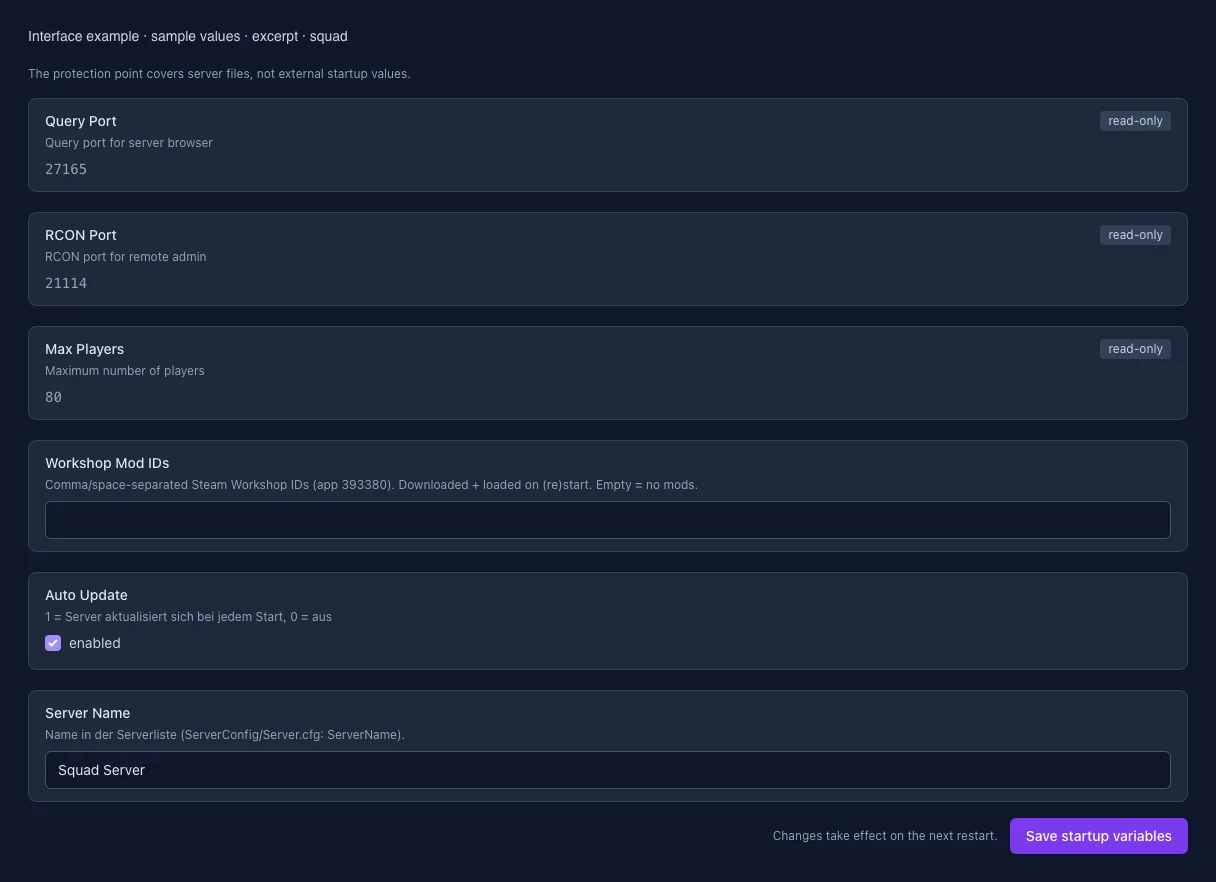
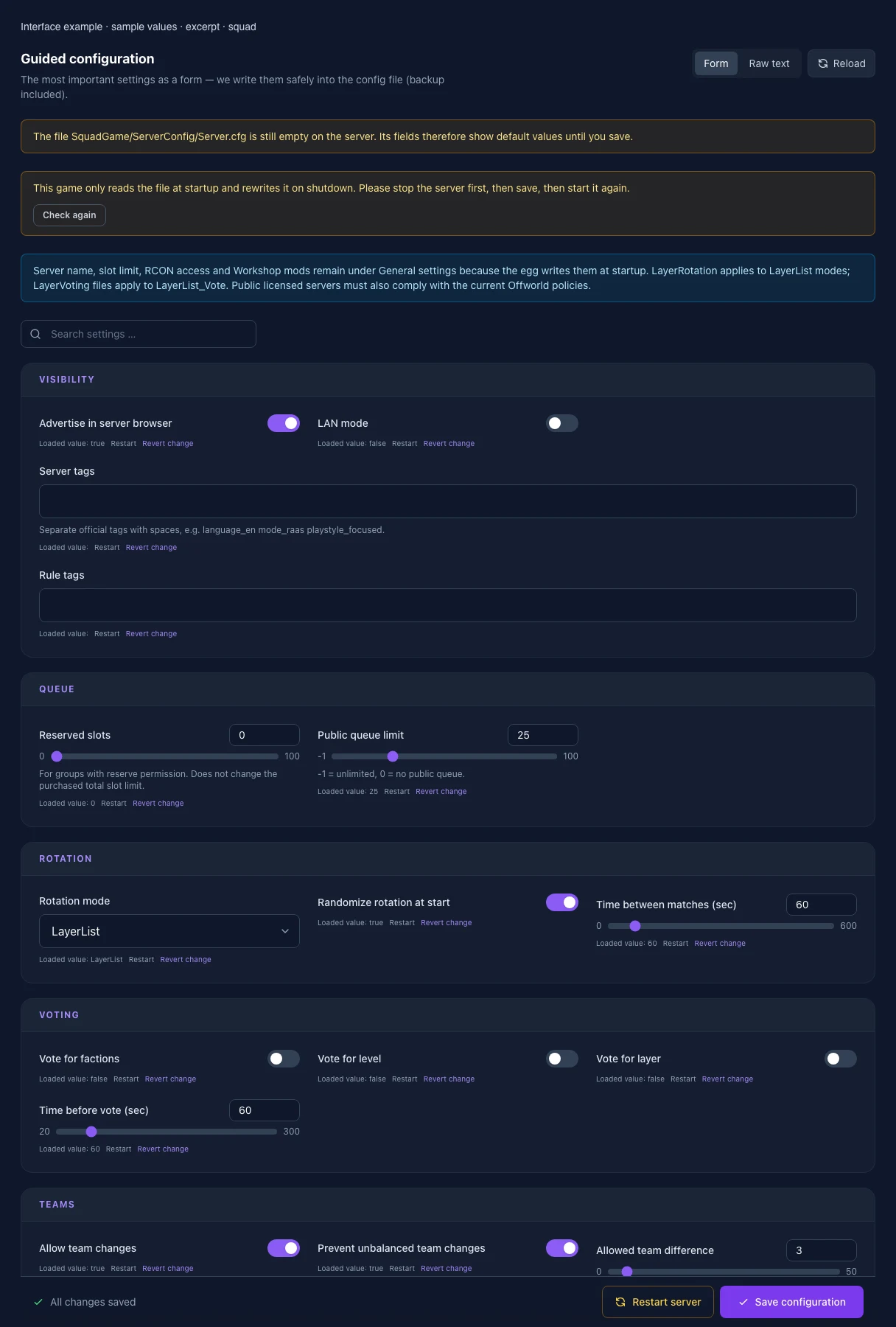
The image shows the interface on its capture date; earlier versions may differ.
Excerpt of the current interface with sample values. Values and prerequisites illustrate the controls; available tools depend on server software, plugins and permissions. · Captured on 2026-10-08Excerpt of the current interface with sample values. Values and prerequisites illustrate the controls; available tools depend on server software, plugins and permissions. · Captured on 2026-10-08
What the settings do
These values come from our guided editors. Defaults are the editor starting values; they do not show the contents of a customer server.
Advertise in server browser
Setting
ShouldAdvertise
Default
true
LAN mode
Setting
IsLANMatch
Default
false
Reserved slots
For groups with reserve permission. Does not change the purchased total slot limit.
Setting
NumReservedSlots
Default
0
Range / options
0 – 100
Public queue limit
-1 = unlimited, 0 = no public queue.
Setting
PublicQueueLimit
Default
25
Range / options
-1 – 100
Server tags
Separate official tags with spaces, e.g. language_en mode_raas playstyle_focused.
UDP port used by joining clients to reserve their player slot.
Setting
BEACON_PORT
Default
15000
Range / options
1024 – 65535
When it takes effect
Takes effect after saving and restarting the server.
Query Port
Query port for server browser
Setting
QUERY_PORT
Default
27165
Range / options
1024 – 65535
When it takes effect
Takes effect after saving and restarting the server.
Max Players
Maximum number of players
Setting
MAX_PLAYERS
Default
80
Range / options
1 – 100
When it takes effect
Takes effect after saving and restarting the server.
Workshop Mod IDs
Comma/space-separated Steam Workshop IDs (app 393380). Downloaded + loaded on (re)start. Empty = no mods.
Setting
MOD_IDS
Default
When it takes effect
Takes effect after saving and restarting the server.
Auto Update
1 = Server aktualisiert sich bei jedem Start, 0 = aus
Setting
AUTO_UPDATE
Default
1
When it takes effect
Takes effect after saving and restarting the server.
Server Name
Name in der Serverliste (ServerConfig/Server.cfg: ServerName).
Setting
SERVER_NAME
Default
Squad Server
When it takes effect
Takes effect after saving and restarting the server.
Loading...
Cookie settings
We use cookies to improve your experience and analyze our website.
Cookie settings
Essential cookies
Required
These cookies are required for the core functions of the website and cannot be disabled.
Analytics cookies
Help us understand how the website and customer area are used (our own usage analytics, Google Analytics, Microsoft Clarity).
Marketing cookies
Allow the pseudonymous matching of an ad click to an order (including your email address as a hash value sent to Google) and the Google Ads tag for remarketing lists.