Game updates, plugin versions and improvements to our interface with a traceable history.
Recorded, available and installed are different states. Your actual installation status and suitable updates are shown in the server panel.
InterfaceDeployed state checked
Guided startup parameters
The running panel release contains a change to this tool. Recorded field differences show new, removed or changed settings. The date identifies when the deployed state was checked; existing game and plugin installations are not updated by this interface change.
InterfaceDeployed state checked
Guided startup parameters
The running panel release contains a change to this tool. Recorded field differences show new, removed or changed settings. The date identifies when the deployed state was checked; existing game and plugin installations are not updated by this interface change.
InterfaceDeployed state checked
Guided startup parameters
The running panel release contains a change to this tool. Recorded field differences show new, removed or changed settings. The date identifies when the deployed state was checked; existing game and plugin installations are not updated by this interface change.
InterfaceDeployed state checked
Guided startup parameters
The running panel release contains a change to this tool. Recorded field differences show new, removed or changed settings. The date identifies when the deployed state was checked; existing game and plugin installations are not updated by this interface change.
InterfaceDeployed state checked
Guided startup parameters
The running panel release contains a change to this tool. Recorded field differences show new, removed or changed settings. The date identifies when the deployed state was checked; existing game and plugin installations are not updated by this interface change.
InterfaceDeployed state checked
Guided startup parameters
The running panel release contains a change to this tool. Recorded field differences show new, removed or changed settings. The date identifies when the deployed state was checked; existing game and plugin installations are not updated by this interface change.
InterfaceDeployed state checked
Guided startup parameters
The running panel release contains a change to this tool. Recorded field differences show new, removed or changed settings. The date identifies when the deployed state was checked; existing game and plugin installations are not updated by this interface change.
InterfaceDeployed state checked
Guided startup parameters
The running panel release contains a change to this tool. Recorded field differences show new, removed or changed settings. The date identifies when the deployed state was checked; existing game and plugin installations are not updated by this interface change.
InterfaceDeployed state checked
Guided startup parameters
The running panel release contains a change to this tool. Recorded field differences show new, removed or changed settings. The date identifies when the deployed state was checked; existing game and plugin installations are not updated by this interface change.
InterfaceDeployed state checked
Guided startup parameters
The running panel release contains a change to this tool. Recorded field differences show new, removed or changed settings. The date identifies when the deployed state was checked; existing game and plugin installations are not updated by this interface change.
Game updatePublished
Hotfix 14.2.1 released!
Announcement from the official source. The source describes the changes; your server installation status is shown separately in the update center.
Effects on plugins
No independent plugin compatibility test is documented for this announcement. Check the affected plugins in the update center before changing game versions.
The running panel release contains a change to this tool. Recorded field differences show new, removed or changed settings. The date identifies when the deployed state was checked; existing game and plugin installations are not updated by this interface change.
InterfaceDeployed state checked
Guided startup parameters
The running panel release contains a change to this tool. Recorded field differences show new, removed or changed settings. The date identifies when the deployed state was checked; existing game and plugin installations are not updated by this interface change.
InterfaceDeployed state checked
Guided startup parameters
The running panel release contains a change to this tool. Recorded field differences show new, removed or changed settings. The date identifies when the deployed state was checked; existing game and plugin installations are not updated by this interface change.
InterfaceDeployed state checked
Guided startup parameters
The running panel release contains a change to this tool. Recorded field differences show new, removed or changed settings. The date identifies when the deployed state was checked; existing game and plugin installations are not updated by this interface change.
SettingDeployed state checked
Eco: settings
The running panel release contains a change to this tool. Recorded field differences show new, removed or changed settings. The date identifies when the deployed state was checked; existing game and plugin installations are not updated by this interface change.
Changed settings (55)
UPNP: Changed
UPNP
UPNP OFF
Before
Setting
UPNP
Default
false
When it takes effect
Takes effect after saving and restarting the server.
After
Setting
UPNP
Default
false
When it takes effect
Takes effect after saving and restarting the server.
DetailedDescription: Changed
DEDES
Before
Setting
DEDES
Default
When it takes effect
Takes effect after saving and restarting the server.
After
Setting
DEDES
Default
When it takes effect
Takes effect after saving and restarting the server.
Max Connections: Changed
MAX_CON
Before
Setting
MAX_CON
Default
-1
Range / options
-1 – 200
When it takes effect
Takes effect after saving and restarting the server.
After
Setting
MAX_CON
Default
-1
Range / options
-1 – 200
When it takes effect
Takes effect after saving and restarting the server.
Public Server: Changed
PUB_SRV
Public Server = true | Private Server = false
Before
Setting
PUB_SRV
Default
false
Range / options
true, false
When it takes effect
Takes effect after saving and restarting the server.
After
Setting
PUB_SRV
Default
false
Range / options
true, false
When it takes effect
Takes effect after saving and restarting the server.
Server Description: Changed
SRV_DES
Server Description
Before
Setting
SRV_DES
Default
Hosted by Pterodactyl
When it takes effect
Takes effect after saving and restarting the server.
After
Setting
SRV_DES
Default
Hosted by Pterodactyl
When it takes effect
Takes effect after saving and restarting the server.
Playtime: Changed
PLAYTIME
Before
Setting
PLAYTIME
Default
When it takes effect
Takes effect after saving and restarting the server.
After
Setting
PLAYTIME
Default
When it takes effect
Takes effect after saving and restarting the server.
Web server port: Changed
WEB_PORT
port
Before
Setting
WEB_PORT
Default
3001
When it takes effect
Takes effect after saving and restarting the server.
After
Setting
WEB_PORT
Default
3001
Range / options
0 – 999999
When it takes effect
Takes effect after saving and restarting the server.
Webserver URL: Changed
WEBSRVURL
Before
Setting
WEBSRVURL
Default
When it takes effect
Takes effect after saving and restarting the server.
After
Setting
WEBSRVURL
Default
When it takes effect
Takes effect after saving and restarting the server.
Auto Update: Changed
AUTO_UPDATE
Before
Setting
AUTO_UPDATE
Default
1
When it takes effect
Takes effect after saving and restarting the server.
After
Setting
AUTO_UPDATE
Default
1
When it takes effect
Takes effect after saving and restarting the server.
Maximum banked hours: Changed
/MaxSavedHours
Before
Setting
/MaxSavedHours
Default
15
Range / options
0 – 168
After
Setting
/MaxSavedHours
Default
15
Range / options
0 – 168
Swim speed (ocean): Changed
/SwimSpeed/Ocean
Before
Setting
/SwimSpeed/Ocean
Default
0.75
Range / options
0.1 – 2
After
Setting
/SwimSpeed/Ocean
Default
0.75
Range / options
0.1 – 2
Daily refresh: hour: Changed
/RefreshLocalHours
Hour (server time) at which playtime is recalculated every day.
Hours of playtime granted on this weekday. Only applies while exhaustion is enabled.
Before
Setting
/WednesdayExhaustionRefreshHours
Default
3
Range / options
0 – 24
After
Setting
/WednesdayExhaustionRefreshHours
Default
3
Range / options
0 – 24
Calories per second (deep ocean): Changed
/CalorieConsumptionRate/DeepOcean
Before
Setting
/CalorieConsumptionRate/DeepOcean
Default
30
Range / options
0 – 100
After
Setting
/CalorieConsumptionRate/DeepOcean
Default
30
Range / options
0 – 100
Target player count (world and meteor scaling): Changed
/GameSettings/DesiredNumberOfPlayers
Eco scales world size and the meteor schedule to this player count; there is no fixed connection limit. More players need more RAM and CPU — the recommendation follows your plan.
The running panel release contains a change to this tool. Recorded field differences show new, removed or changed settings. The date identifies when the deployed state was checked; existing game and plugin installations are not updated by this interface change.
SettingDeployed state checked
Eco: settings
The running panel release contains a change to this tool. Recorded field differences show new, removed or changed settings. The date identifies when the deployed state was checked; existing game and plugin installations are not updated by this interface change.
Changed settings (55)
UPNP: Changed
UPNP
UPNP OFF
Before
Setting
UPNP
Default
false
When it takes effect
Takes effect after saving and restarting the server.
After
Setting
UPNP
Default
false
When it takes effect
Takes effect after saving and restarting the server.
DetailedDescription: Changed
DEDES
Before
Setting
DEDES
Default
When it takes effect
Takes effect after saving and restarting the server.
After
Setting
DEDES
Default
When it takes effect
Takes effect after saving and restarting the server.
Max Connections: Changed
MAX_CON
Before
Setting
MAX_CON
Default
-1
Range / options
-1 – 200
When it takes effect
Takes effect after saving and restarting the server.
After
Setting
MAX_CON
Default
-1
Range / options
-1 – 200
When it takes effect
Takes effect after saving and restarting the server.
Public Server: Changed
PUB_SRV
Public Server = true | Private Server = false
Before
Setting
PUB_SRV
Default
false
Range / options
true, false
When it takes effect
Takes effect after saving and restarting the server.
After
Setting
PUB_SRV
Default
false
Range / options
true, false
When it takes effect
Takes effect after saving and restarting the server.
Server Description: Changed
SRV_DES
Server Description
Before
Setting
SRV_DES
Default
Hosted by Pterodactyl
When it takes effect
Takes effect after saving and restarting the server.
After
Setting
SRV_DES
Default
Hosted by Pterodactyl
When it takes effect
Takes effect after saving and restarting the server.
Playtime: Changed
PLAYTIME
Before
Setting
PLAYTIME
Default
When it takes effect
Takes effect after saving and restarting the server.
After
Setting
PLAYTIME
Default
When it takes effect
Takes effect after saving and restarting the server.
Web server port: Changed
WEB_PORT
port
Before
Setting
WEB_PORT
Default
3001
When it takes effect
Takes effect after saving and restarting the server.
After
Setting
WEB_PORT
Default
3001
When it takes effect
Takes effect after saving and restarting the server.
Webserver URL: Changed
WEBSRVURL
Before
Setting
WEBSRVURL
Default
When it takes effect
Takes effect after saving and restarting the server.
After
Setting
WEBSRVURL
Default
When it takes effect
Takes effect after saving and restarting the server.
Auto Update: Changed
AUTO_UPDATE
Before
Setting
AUTO_UPDATE
Default
1
When it takes effect
Takes effect after saving and restarting the server.
After
Setting
AUTO_UPDATE
Default
1
When it takes effect
Takes effect after saving and restarting the server.
Maximum banked hours: Changed
/MaxSavedHours
Before
Setting
/MaxSavedHours
Default
15
Range / options
0 – 168
After
Setting
/MaxSavedHours
Default
15
Range / options
0 – 168
Swim speed (ocean): Changed
/SwimSpeed/Ocean
Before
Setting
/SwimSpeed/Ocean
Default
0.75
Range / options
0.1 – 2
After
Setting
/SwimSpeed/Ocean
Default
0.75
Range / options
0.1 – 2
Daily refresh: hour: Changed
/RefreshLocalHours
Hour (server time) at which playtime is recalculated every day.
Hours of playtime granted on this weekday. Only applies while exhaustion is enabled.
Before
Setting
/WednesdayExhaustionRefreshHours
Default
3
Range / options
0 – 24
After
Setting
/WednesdayExhaustionRefreshHours
Default
3
Range / options
0 – 24
Calories per second (deep ocean): Changed
/CalorieConsumptionRate/DeepOcean
Before
Setting
/CalorieConsumptionRate/DeepOcean
Default
30
Range / options
0 – 100
After
Setting
/CalorieConsumptionRate/DeepOcean
Default
30
Range / options
0 – 100
Target player count (world and meteor scaling): Changed
/GameSettings/DesiredNumberOfPlayers
Eco scales world size and the meteor schedule to this player count; there is no fixed connection limit. More players need more RAM and CPU — the recommendation follows your plan.
The running panel release contains a change to this tool. Recorded field differences show new, removed or changed settings. The date identifies when the deployed state was checked; existing game and plugin installations are not updated by this interface change.
InterfaceDeployed state checked
Guided startup parameters
The running panel release contains a change to this tool. Recorded field differences show new, removed or changed settings. The date identifies when the deployed state was checked; existing game and plugin installations are not updated by this interface change.
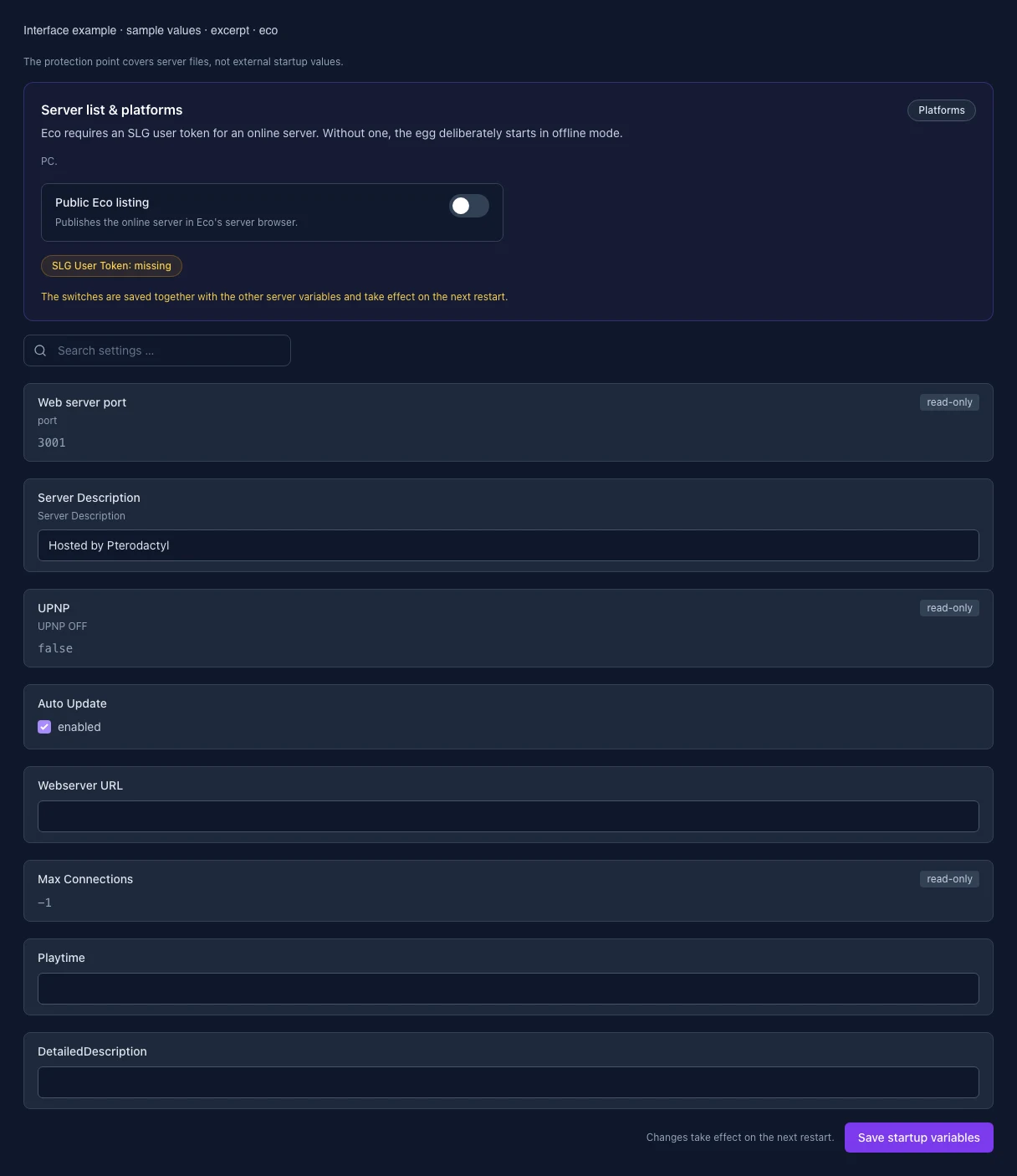
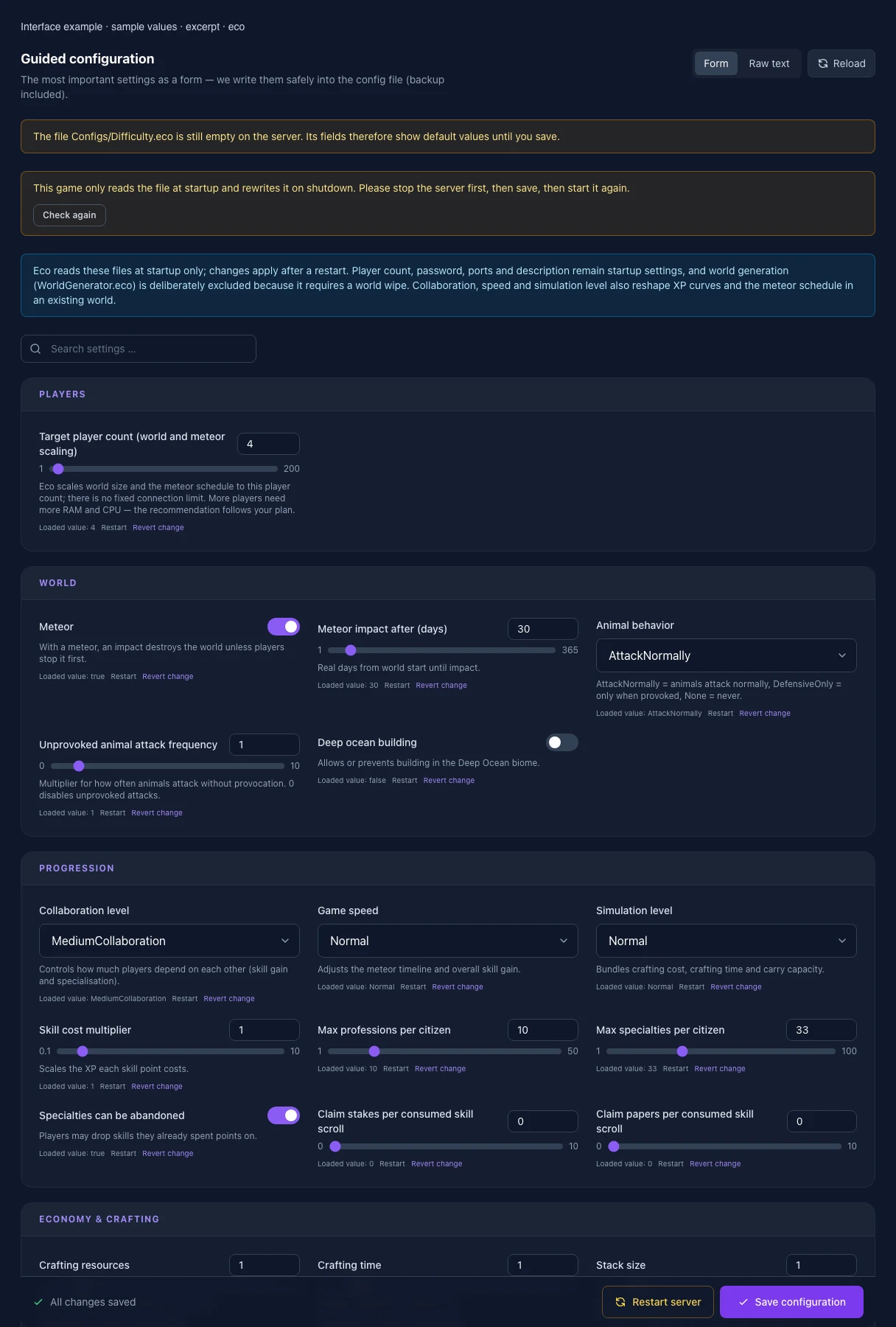
What the interface looks like
The image shows the interface on its capture date; earlier versions may differ.
Excerpt of the current interface with sample values. Values and prerequisites illustrate the controls; available tools depend on server software, plugins and permissions. · Captured on 2026-10-08Excerpt of the current interface with sample values. Values and prerequisites illustrate the controls; available tools depend on server software, plugins and permissions. · Captured on 2026-10-08
What the settings do
These values come from our guided editors. Defaults are the editor starting values; they do not show the contents of a customer server.
Target player count (world and meteor scaling)
Eco scales world size and the meteor schedule to this player count; there is no fixed connection limit. More players need more RAM and CPU — the recommendation follows your plan.
Setting
/GameSettings/DesiredNumberOfPlayers
Default
4
Range / options
1 – 200
Meteor
With a meteor, an impact destroys the world unless players stop it first.
Enabled: when calories run out while swimming, the player is teleported to the nearest shore.
Setting
/PlayerCanDrownWhenSwimming
Default
true
Exhaustion (playtime limit)
Limits daily playtime per player. The hours per weekday are configured below (Exhaustion.eco).
Setting
/GameSettings/ExhaustionEnabled
Default
true
Hours played per day
Only applies while exhaustion is enabled.
Setting
/GameSettings/HoursPlayedPerDay
Default
3
Range / options
0.5 – 24
Monday
Hours of playtime granted on this weekday. Only applies while exhaustion is enabled.
Setting
/MondayExhaustionRefreshHours
Default
3
Range / options
0 – 24
Tuesday
Hours of playtime granted on this weekday. Only applies while exhaustion is enabled.
Setting
/TuesdayExhaustionRefreshHours
Default
3
Range / options
0 – 24
Wednesday
Hours of playtime granted on this weekday. Only applies while exhaustion is enabled.
Setting
/WednesdayExhaustionRefreshHours
Default
3
Range / options
0 – 24
Thursday
Hours of playtime granted on this weekday. Only applies while exhaustion is enabled.
Setting
/ThursdayExhaustionRefreshHours
Default
3
Range / options
0 – 24
Friday
Hours of playtime granted on this weekday. Only applies while exhaustion is enabled.
Setting
/FridayExhaustionRefreshHours
Default
6
Range / options
0 – 24
Saturday
Hours of playtime granted on this weekday. Only applies while exhaustion is enabled.
Setting
/SaturdayExhaustionRefreshHours
Default
6
Range / options
0 – 24
Sunday
Hours of playtime granted on this weekday. Only applies while exhaustion is enabled.
Setting
/SundayExhaustionRefreshHours
Default
6
Range / options
0 – 24
Bank unused playtime
At the daily refresh, unused playtime is added to a time bank.
Setting
/AllowPlaytimeSaving
Default
true
Maximum banked hours
Setting
/MaxSavedHours
Default
15
Range / options
0 – 168
Pause while resting
The playtime countdown pauses while the player sits or sleeps.
Setting
/AllowExhaustionPauseOnRest
Default
true
Bonus hours when enabled
Extra playtime each player receives when exhaustion is first enabled.
Setting
/BonusHoursOnExhaustionEnabled
Default
2
Range / options
0 – 24
Retroactive bonus for late joiners
Players joining after the first day receive the bonus retroactively.
Setting
/BonusRetroactiveHoursAfterStart
Default
true
Daily refresh: hour
Hour (server time) at which playtime is recalculated every day.
Setting
/RefreshLocalHours
Default
0
Range / options
0 – 23
Daily refresh: minute
Setting
/RefreshLocalMinutes
Default
0
Range / options
0 – 59
Web server port
port
Setting
WEB_PORT
Default
3001
Range / options
0 – 999999
When it takes effect
Takes effect after saving and restarting the server.
List in the public server browser
Controls whether the server appears in the relevant public server browser.
Setting
PUB_SRV
Default
false
Range / options
true, false
When it takes effect
Takes effect after saving and restarting the server.
Server Description
Server Description
Setting
SRV_DES
Default
Hosted by Pterodactyl
When it takes effect
Takes effect after saving and restarting the server.
UPNP
UPNP OFF
Setting
UPNP
Default
false
When it takes effect
Takes effect after saving and restarting the server.
Auto Update
Setting
AUTO_UPDATE
Default
1
When it takes effect
Takes effect after saving and restarting the server.
Webserver URL
Setting
WEBSRVURL
Default
When it takes effect
Takes effect after saving and restarting the server.
Max Connections
Setting
MAX_CON
Default
-1
Range / options
-1 – 200
When it takes effect
Takes effect after saving and restarting the server.
Playtime
Setting
PLAYTIME
Default
When it takes effect
Takes effect after saving and restarting the server.
DetailedDescription
Setting
DEDES
Default
When it takes effect
Takes effect after saving and restarting the server.
Loading...
Cookie settings
We use cookies to improve your experience and analyze our website.
Cookie settings
Essential cookies
Required
These cookies are required for the core functions of the website and cannot be disabled.
Analytics cookies
Help us understand how the website and customer area are used (our own usage analytics, Google Analytics, Microsoft Clarity).
Marketing cookies
Allow the pseudonymous matching of an ad click to an order (including your email address as a hash value sent to Google) and the Google Ads tag for remarketing lists.