Game updates, plugin versions and improvements to our interface with a traceable history.
Recorded, available and installed are different states. Your actual installation status and suitable updates are shown in the server panel.
Game updatePublished
Hotfix for the Rising Tide update
Announcement from the official source. The source describes the changes; your server installation status is shown separately in the update center.
Effects on plugins
No independent plugin compatibility test is documented for this announcement. Check the affected plugins in the update center before changing game versions.
Announcement from the official source. The source describes the changes; your server installation status is shown separately in the update center.
Effects on plugins
No independent plugin compatibility test is documented for this announcement. Check the affected plugins in the update center before changing game versions.
Announcement from the official source. The source describes the changes; your server installation status is shown separately in the update center.
Effects on plugins
No independent plugin compatibility test is documented for this announcement. Check the affected plugins in the update center before changing game versions.
Announcement from the official source. The source describes the changes; your server installation status is shown separately in the update center.
Effects on plugins
No independent plugin compatibility test is documented for this announcement. Check the affected plugins in the update center before changing game versions.
Announcement from the official source. The source describes the changes; your server installation status is shown separately in the update center.
Effects on plugins
No independent plugin compatibility test is documented for this announcement. Check the affected plugins in the update center before changing game versions.
Holiday update: Fixes, new submarine, and DLC update
Announcement from the official source. The source describes the changes; your server installation status is shown separately in the update center.
Effects on plugins
No independent plugin compatibility test is documented for this announcement. Check the affected plugins in the update center before changing game versions.
Announcement from the official source. The source describes the changes; your server installation status is shown separately in the update center.
Effects on plugins
No independent plugin compatibility test is documented for this announcement. Check the affected plugins in the update center before changing game versions.
Announcement from the official source. The source describes the changes; your server installation status is shown separately in the update center.
Effects on plugins
No independent plugin compatibility test is documented for this announcement. Check the affected plugins in the update center before changing game versions.
Announcement from the official source. The source describes the changes; your server installation status is shown separately in the update center.
Effects on plugins
No independent plugin compatibility test is documented for this announcement. Check the affected plugins in the update center before changing game versions.
Announcement from the official source. The source describes the changes; your server installation status is shown separately in the update center.
Effects on plugins
No independent plugin compatibility test is documented for this announcement. Check the affected plugins in the update center before changing game versions.
Announcement from the official source. The source describes the changes; your server installation status is shown separately in the update center.
Effects on plugins
No independent plugin compatibility test is documented for this announcement. Check the affected plugins in the update center before changing game versions.
Announcement from the official source. The source describes the changes; your server installation status is shown separately in the update center.
Effects on plugins
No independent plugin compatibility test is documented for this announcement. Check the affected plugins in the update center before changing game versions.
Announcement from the official source. The source describes the changes; your server installation status is shown separately in the update center.
Effects on plugins
No independent plugin compatibility test is documented for this announcement. Check the affected plugins in the update center before changing game versions.
The image shows the interface on its capture date; earlier versions may differ.
Excerpt of the current interface with sample values. Values and prerequisites illustrate the controls; available tools depend on server software, plugins and permissions. · Captured on 2026-10-08Excerpt of the current interface with sample values. Values and prerequisites illustrate the controls; available tools depend on server software, plugins and permissions. · Captured on 2026-10-08
What the settings do
These values come from our guided editors. Defaults are the editor starting values; they do not show the contents of a customer server.
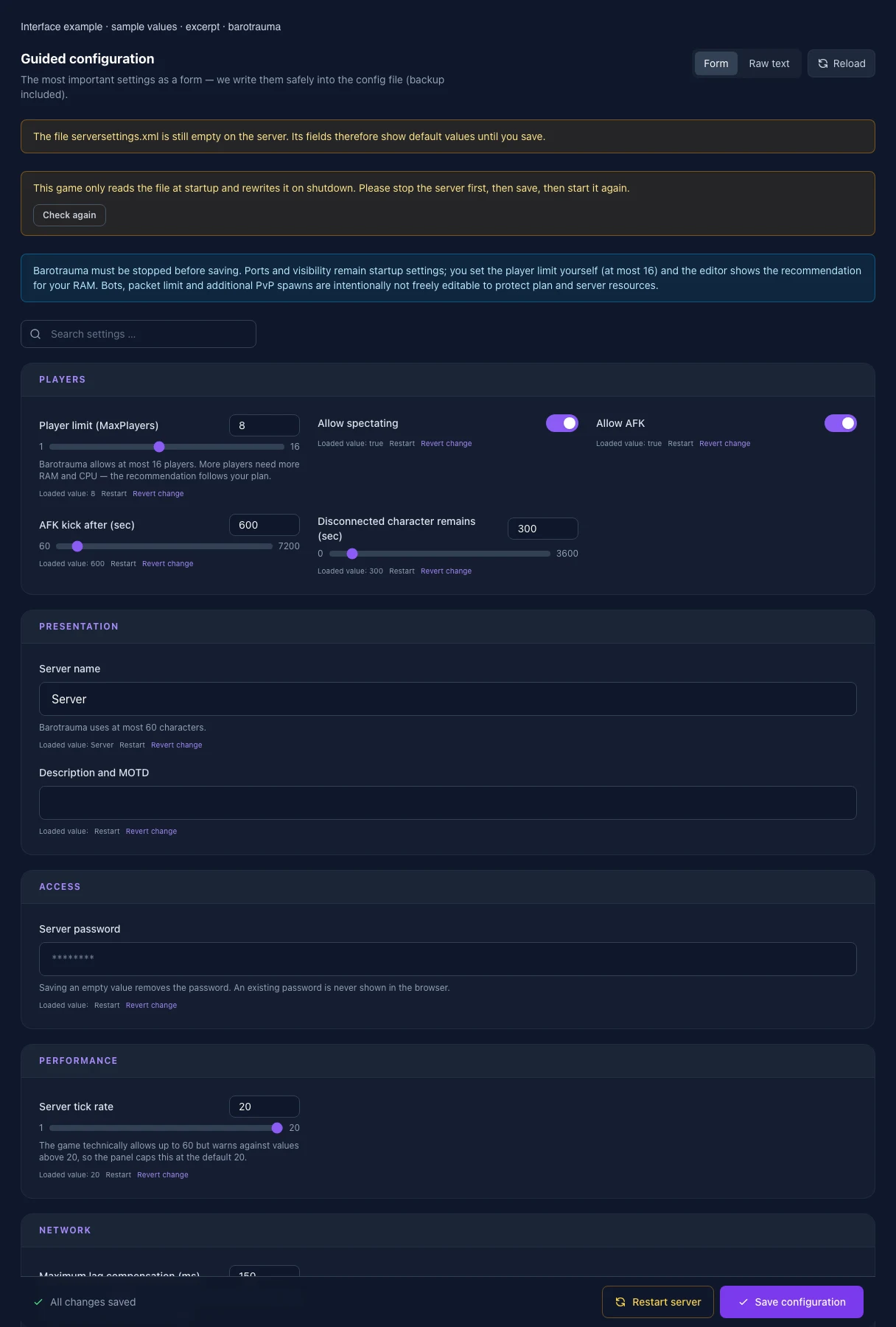
Player limit (MaxPlayers)
Barotrauma allows at most 16 players. More players need more RAM and CPU — the recommendation follows your plan.
Setting
MaxPlayers
Default
8
Range / options
1 – 16
Server name
At most 60 characters; cannot be empty. Emoji may count as two characters.
Setting
ServerName
Default
Server
Description and MOTD
At most 2000 characters. Emoji may count as two characters. Leave empty to remove the description.
Setting
ServerMessageText
Default
Server tick rate
The game technically allows up to 60 but warns against values above 20, so the panel caps this at the default 20.
Setting
TickRate
Default
20
Range / options
1 – 20
Maximum lag compensation (ms)
Setting
MaxLagCompensation
Default
150
Range / options
0 – 500
Save server logs
Setting
SaveServerLogs
Default
true
Allow mod downloads
Off prompts players to use Workshop downloads instead and reduces direct server transfers.
Only applies in Permadeath mode and prevents obtaining any new character after death.
Setting
IronmanMode
Default
false
Friendly fire
Setting
AllowFriendlyFire
Default
true
Allow disguises
Setting
AllowDisguises
Default
true
Allow rewiring
Setting
AllowRewiring
Default
true
Lock all default wires
Setting
LockAllDefaultWires
Default
false
Allow linking Wi-Fi to chat
Setting
AllowLinkingWifiToChat
Default
false
Allow immediate item delivery
Setting
AllowImmediateItemDelivery
Default
true
Allow drag-and-drop giving
Setting
AllowDragAndDropGive
Default
true
Destructible outposts
Setting
DestructibleOutposts
Default
false
Killable NPCs
Setting
KillableNPCs
Default
true
Kick voting
Setting
AllowVoteKick
Default
true
End-round voting
Setting
AllowEndVoting
Default
true
End-round vote ratio
Setting
EndVoteRequiredRatio
Default
0.6
Range / options
0 – 1
General vote ratio
Setting
VoteRequiredRatio
Default
0.6
Range / options
0 – 1
Kick vote ratio
Setting
KickVoteRequiredRatio
Default
0.6
Range / options
0 – 1
Vote duration (sec)
Setting
VoteTimeout
Default
30
Range / options
5 – 300
Kick-vote cooldown (sec)
Setting
DisallowKickVoteTime
Default
120
Range / options
0 – 3600
Traitor probability
Setting
TraitorProbability
Default
0
Range / options
0 – 1
Minimum players for traitors
Setting
TraitorsMinPlayerCount
Default
1
Range / options
1 – 16
Karma system
Uses the existing karma preset; this editor does not modify the separate karma file.
Setting
KarmaEnabled
Default
false
Looted money destination
Setting
LootedMoneyDestination
Default
Bank
Range / options
Bank, Wallet
Track opponent in PvP
Setting
TrackOpponentInPvP
Default
true
PvP win score
Setting
WinScorePvP
Default
200
Range / options
1 – 1000
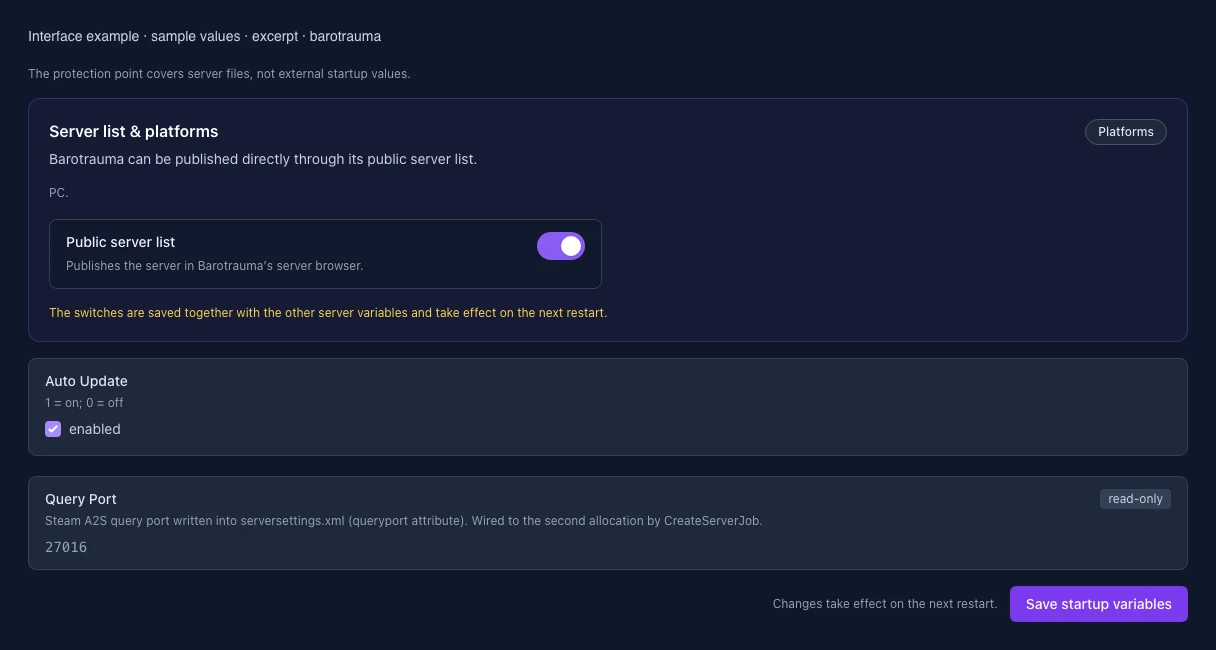
Auto Update
1 = on; 0 = off
Setting
AUTO_UPDATE
Default
1
When it takes effect
Takes effect after saving and restarting the server.
Steam query port
Port for the Steam server query. It is assigned automatically and is read-only here.
Setting
QUERY_PORT
Default
27016
Range / options
… – 65535
When it takes effect
Takes effect after saving and restarting the server.
List in the public server browser
Controls whether the server appears in the relevant public server browser.
Setting
PUBLIC_SERVER
Default
True
Range / options
True, False
When it takes effect
Takes effect after saving and restarting the server.
Loading...
Cookie settings
We use cookies to improve your experience and analyze our website.
Cookie settings
Essential cookies
Required
These cookies are required for the core functions of the website and cannot be disabled.
Analytics cookies
Help us understand how the website and customer area are used (our own usage analytics, Google Analytics, Microsoft Clarity).
Marketing cookies
Allow the pseudonymous matching of an ad click to an order (including your email address as a hash value sent to Google) and the Google Ads tag for remarketing lists.