Game updates, plugin versions and improvements to our interface with a traceable history.
Recorded, available and installed are different states. Your actual installation status and suitable updates are shown in the server panel.
InterfaceDeployed state checked
Guided startup parameters
The running panel release contains a change to this tool. Recorded field differences show new, removed or changed settings. The date identifies when the deployed state was checked; existing game and plugin installations are not updated by this interface change.
InterfaceDeployed state checked
Guided startup parameters
The running panel release contains a change to this tool. Recorded field differences show new, removed or changed settings. The date identifies when the deployed state was checked; existing game and plugin installations are not updated by this interface change.
InterfaceDeployed state checked
Guided startup parameters
The running panel release contains a change to this tool. Recorded field differences show new, removed or changed settings. The date identifies when the deployed state was checked; existing game and plugin installations are not updated by this interface change.
InterfaceDeployed state checked
Guided startup parameters
The running panel release contains a change to this tool. Recorded field differences show new, removed or changed settings. The date identifies when the deployed state was checked; existing game and plugin installations are not updated by this interface change.
InterfaceDeployed state checked
Guided startup parameters
The running panel release contains a change to this tool. Recorded field differences show new, removed or changed settings. The date identifies when the deployed state was checked; existing game and plugin installations are not updated by this interface change.
InterfaceDeployed state checked
Valheim: game tools
The running panel release contains a change to this tool. Recorded field differences show new, removed or changed settings. The date identifies when the deployed state was checked; existing game and plugin installations are not updated by this interface change.
InterfaceDeployed state checked
Guided startup parameters
The running panel release contains a change to this tool. Recorded field differences show new, removed or changed settings. The date identifies when the deployed state was checked; existing game and plugin installations are not updated by this interface change.
InterfaceDeployed state checked
Guided startup parameters
The running panel release contains a change to this tool. Recorded field differences show new, removed or changed settings. The date identifies when the deployed state was checked; existing game and plugin installations are not updated by this interface change.
InterfaceDeployed state checked
Guided startup parameters
The running panel release contains a change to this tool. Recorded field differences show new, removed or changed settings. The date identifies when the deployed state was checked; existing game and plugin installations are not updated by this interface change.
InterfaceDeployed state checked
Guided startup parameters
The running panel release contains a change to this tool. Recorded field differences show new, removed or changed settings. The date identifies when the deployed state was checked; existing game and plugin installations are not updated by this interface change.
InterfaceDeployed state checked
Guided startup parameters
The running panel release contains a change to this tool. Recorded field differences show new, removed or changed settings. The date identifies when the deployed state was checked; existing game and plugin installations are not updated by this interface change.
InterfaceDeployed state checked
Guided startup parameters
The running panel release contains a change to this tool. Recorded field differences show new, removed or changed settings. The date identifies when the deployed state was checked; existing game and plugin installations are not updated by this interface change.
Game updatePublished
Patch 1.0.20
Announcement from the official source. The source describes the changes; your server installation status is shown separately in the update center.
Effects on plugins
No independent plugin compatibility test is documented for this announcement. Check the affected plugins in the update center before changing game versions.
The running panel release contains a change to this tool. Recorded field differences show new, removed or changed settings. The date identifies when the deployed state was checked; existing game and plugin installations are not updated by this interface change.
InterfaceDeployed state checked
Guided startup parameters
The running panel release contains a change to this tool. Recorded field differences show new, removed or changed settings. The date identifies when the deployed state was checked; existing game and plugin installations are not updated by this interface change.
InterfaceDeployed state checked
Guided startup parameters
The running panel release contains a change to this tool. Recorded field differences show new, removed or changed settings. The date identifies when the deployed state was checked; existing game and plugin installations are not updated by this interface change.
InterfaceDeployed state checked
Guided startup parameters
The running panel release contains a change to this tool. Recorded field differences show new, removed or changed settings. The date identifies when the deployed state was checked; existing game and plugin installations are not updated by this interface change.
InterfaceDeployed state checked
Guided startup parameters
The running panel release contains a change to this tool. Recorded field differences show new, removed or changed settings. The date identifies when the deployed state was checked; existing game and plugin installations are not updated by this interface change.
InterfaceDeployed state checked
Guided startup parameters
The running panel release contains a change to this tool. Recorded field differences show new, removed or changed settings. The date identifies when the deployed state was checked; existing game and plugin installations are not updated by this interface change.
InterfaceDeployed state checked
Guided startup parameters
The running panel release contains a change to this tool. Recorded field differences show new, removed or changed settings. The date identifies when the deployed state was checked; existing game and plugin installations are not updated by this interface change.
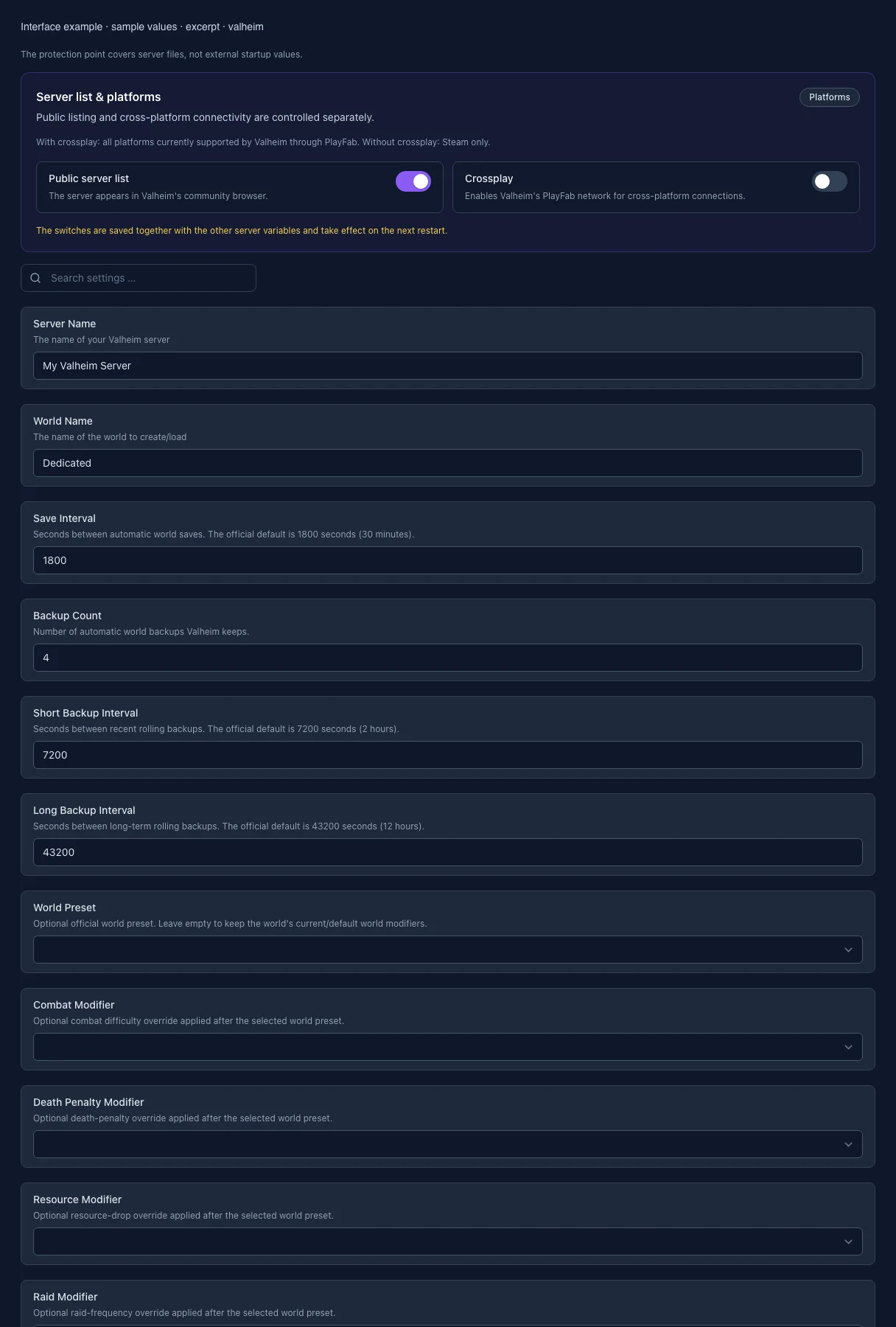
What the interface looks like
The image shows the interface on its capture date; earlier versions may differ.
Excerpt of the current interface with sample values. Values and prerequisites illustrate the controls; available tools depend on server software, plugins and permissions. · Captured on 2026-10-08
What the settings do
These values come from our guided editors. Defaults are the editor starting values; they do not show the contents of a customer server.
Server name
Name in the server list, at most 60 characters.
Setting
SERVER_NAME
Default
My Valheim Server
When it takes effect
Takes effect after saving and restarting the server.
World name
Selects the world or its save name. Changing it later loads another or creates a new world; the old one is not deleted.
Setting
WORLD_NAME
Default
Dedicated
When it takes effect
Takes effect after saving and restarting the server.
List in the public server browser
Controls whether the server appears in the relevant public server browser.
Setting
PUBLIC_SERVER
Default
1
When it takes effect
Takes effect after saving and restarting the server.
Crossplay
Allows supported platforms to play together on this server.
Setting
CROSSPLAY_ENABLED
Default
0
When it takes effect
Takes effect after saving and restarting the server.
World save interval (seconds)
Time between automatic world saves. Backups are only made when the world is saved. Default: 1800 seconds (30 minutes).
Setting
SAVE_INTERVAL
Default
1800
Range / options
60 – 86400
When it takes effect
Takes effect after saving and restarting the server.
Automatic world backups (count)
How many automatic world backups the game keeps (up to 20). A value of 1 turns them off: Valheim then makes no backups at all. The first backup is made no earlier than 20 minutes after the server starts.
Setting
BACKUP_COUNT
Default
4
Range / options
1 – 20
When it takes effect
Takes effect after saving and restarting the server.
Short backup interval (seconds)
How often Valheim renews the newest backup when it saves. Default: 7200 seconds (2 hours).
Setting
BACKUP_SHORT
Default
7200
Range / options
300 – 604800
When it takes effect
Takes effect after saving and restarting the server.
Long backup interval (seconds)
Backups this far apart are kept permanently; once the count is reached, the oldest one is dropped. Default: 43200 seconds (12 hours).
Setting
BACKUP_LONG
Default
43200
Range / options
300 – 2592000
When it takes effect
Takes effect after saving and restarting the server.
Difficulty Preset
Optional world preset. Empty keeps current world modifiers. Individual modifiers override the preset.
Takes effect after saving and restarting the server.
Combat Modifier
Combat difficulty; overrides the selected preset. Empty uses its value.
Setting
COMBAT_MODIFIER
Default
Range / options
, veryeasy, easy, hard, veryhard
When it takes effect
Takes effect after saving and restarting the server.
Death Penalty
Death penalty; overrides the selected preset. Empty uses its value.
Setting
DEATH_PENALTY_MODIFIER
Default
Range / options
, casual, veryeasy, easy, hard, hardcore
When it takes effect
Takes effect after saving and restarting the server.
Resource Amount
Resource amount; overrides the selected preset. Empty uses its value.
Setting
RESOURCES_MODIFIER
Default
Range / options
, muchless, less, more, muchmore, most
When it takes effect
Takes effect after saving and restarting the server.
Raids
Raid frequency; overrides the selected preset. Empty uses its value.
Setting
RAIDS_MODIFIER
Default
Range / options
, none, muchless, less, more, muchmore
When it takes effect
Takes effect after saving and restarting the server.
Portal Restriction
Portal rules; overrides the selected preset. Empty uses its value.
Setting
PORTALS_MODIFIER
Default
Range / options
, casual, hard, veryhard
When it takes effect
Takes effect after saving and restarting the server.
Auto Update
1 = beim Start updaten
Setting
AUTO_UPDATE
Default
1
When it takes effect
Takes effect after saving and restarting the server.
Loading...
Cookie settings
We use cookies to improve your experience and analyze our website.
Cookie settings
Essential cookies
Required
These cookies are required for the core functions of the website and cannot be disabled.
Analytics cookies
Help us understand how the website and customer area are used (our own usage analytics, Google Analytics, Microsoft Clarity).
Marketing cookies
Allow the pseudonymous matching of an ad click to an order (including your email address as a hash value sent to Google) and the Google Ads tag for remarketing lists.