Game updates, plugin versions and improvements to our interface with a traceable history.
Recorded, available and installed are different states. Your actual installation status and suitable updates are shown in the server panel.
SettingDeployed state checked
Left 4 Dead 2: settings
The running panel release contains a change to this tool. Recorded field differences show new, removed or changed settings. The date identifies when the deployed state was checked; existing game and plugin installations are not updated by this interface change.
Changed settings (11)
Hostname: Changed
HOSTNAME
Name des Servers in der Serverliste (hostname).
Before
Setting
HOSTNAME
Default
Left 4 Dead 2 Server
When it takes effect
Takes effect after saving and restarting the server.
After
Setting
HOSTNAME
Default
Left 4 Dead 2 Server
When it takes effect
Takes effect after saving and restarting the server.
Default Map: Changed
SRCDS_MAP
Startkarte (z.B. c1m1_hotel)
Before
Setting
SRCDS_MAP
Default
c1m1_hotel
When it takes effect
Takes effect after saving and restarting the server.
After
Setting
SRCDS_MAP
Default
c1m1_hotel
When it takes effect
Takes effect after saving and restarting the server.
Auto Update: Changed
AUTO_UPDATE
1 = beim Start updaten
Before
Setting
AUTO_UPDATE
Default
1
When it takes effect
Takes effect after saving and restarting the server.
After
Setting
AUTO_UPDATE
Default
1
When it takes effect
Takes effect after saving and restarting the server.
Max Players: Changed
MAX_PLAYERS
Maximale Spielerzahl (+maxplayers)
Before
Setting
MAX_PLAYERS
Default
8
Range / options
… – 32
When it takes effect
Takes effect after saving and restarting the server.
After
Setting
MAX_PLAYERS
Default
8
Range / options
… – 32
When it takes effect
Takes effect after saving and restarting the server.
LAN mode (sv_lan): Changed
sv_lan
1 = local network only, not visible or queryable from the internet. Keep 0 on a rented server.
Before
Setting
sv_lan
Default
0
After
Setting
sv_lan
Default
0
Enable cheats (sv_cheats): Changed
sv_cheats
Allows cheat console commands. With 1, Left 4 Dead 2 stops answering server queries: the server disappears from the server browser and from server lists. Joining via connect still works.
Before
Setting
sv_cheats
Default
0
After
Setting
sv_cheats
Default
0
Game mode (mp_gamemode): Changed
mp_gamemode
Co-op, Versus, Survival, Realism, Realism Versus or Scavenge. Vanilla ignores this direct config line. Choose the mode when starting a map, e.g. map c1m1_hotel versus.
Vanilla: 1 to 4, default 4. Vanilla ignores this direct config line. Changes require SourceMod with sm_cvar; more than 4 additionally requires a multiplayer plugin.
Max player zombies (z_max_player_zombies): Changed
z_max_player_zombies
Vanilla: 0 to 4, default 4. Number of human infected in Versus mode. Vanilla ignores this direct config line; changes require SourceMod with sm_cvar.
Before
Setting
z_max_player_zombies
Default
4
Range / options
0 – 4
After
Setting
z_max_player_zombies
Default
4
Range / options
0 – 4
InterfaceDeployed state checked
Guided startup parameters
The running panel release contains a change to this tool. Recorded field differences show new, removed or changed settings. The date identifies when the deployed state was checked; existing game and plugin installations are not updated by this interface change.
InterfaceDeployed state checked
Guided startup parameters
The running panel release contains a change to this tool. Recorded field differences show new, removed or changed settings. The date identifies when the deployed state was checked; existing game and plugin installations are not updated by this interface change.
SettingDeployed state checked
Left 4 Dead 2: settings
The running panel release contains a change to this tool. Recorded field differences show new, removed or changed settings. The date identifies when the deployed state was checked; existing game and plugin installations are not updated by this interface change.
Changed settings (11)
Hostname: Changed
HOSTNAME
Name des Servers in der Serverliste (hostname).
Before
Setting
HOSTNAME
Default
Left 4 Dead 2 Server
When it takes effect
Takes effect after saving and restarting the server.
After
Setting
HOSTNAME
Default
Left 4 Dead 2 Server
When it takes effect
Takes effect after saving and restarting the server.
Default Map: Changed
SRCDS_MAP
Startkarte (z.B. c1m1_hotel)
Before
Setting
SRCDS_MAP
Default
c1m1_hotel
When it takes effect
Takes effect after saving and restarting the server.
After
Setting
SRCDS_MAP
Default
c1m1_hotel
When it takes effect
Takes effect after saving and restarting the server.
Auto Update: Changed
AUTO_UPDATE
1 = beim Start updaten
Before
Setting
AUTO_UPDATE
Default
1
When it takes effect
Takes effect after saving and restarting the server.
After
Setting
AUTO_UPDATE
Default
1
When it takes effect
Takes effect after saving and restarting the server.
Max Players: Changed
MAX_PLAYERS
Maximale Spielerzahl (+maxplayers)
Before
Setting
MAX_PLAYERS
Default
8
Range / options
… – 32
When it takes effect
Takes effect after saving and restarting the server.
After
Setting
MAX_PLAYERS
Default
8
Range / options
… – 32
When it takes effect
Takes effect after saving and restarting the server.
LAN mode (sv_lan): Changed
sv_lan
1 = LAN only, 0 = public.
Before
Setting
sv_lan
Default
0
After
Setting
sv_lan
Default
0
Enable cheats (sv_cheats): Changed
sv_cheats
Allows console commands. Disable on public servers.
Before
Setting
sv_cheats
Default
0
After
Setting
sv_cheats
Default
0
Game mode (mp_gamemode): Changed
mp_gamemode
Co-op, Versus, Survival, Realism, Realism Versus or Scavenge. Vanilla ignores this direct config line. Choose the mode when starting a map, e.g. map c1m1_hotel versus.
Vanilla: 1 to 4, default 4. Vanilla ignores this direct config line. Changes require SourceMod with sm_cvar; more than 4 additionally requires a multiplayer plugin.
Max player zombies (z_max_player_zombies): Changed
z_max_player_zombies
Vanilla: 0 to 4, default 4. Number of human infected in Versus mode. Vanilla ignores this direct config line; changes require SourceMod with sm_cvar.
Before
Setting
z_max_player_zombies
Default
4
Range / options
0 – 4
After
Setting
z_max_player_zombies
Default
4
Range / options
0 – 4
InterfaceDeployed state checked
Guided startup parameters
The running panel release contains a change to this tool. Recorded field differences show new, removed or changed settings. The date identifies when the deployed state was checked; existing game and plugin installations are not updated by this interface change.
SettingDeployed state checked
Left 4 Dead 2: settings
The running panel release contains a change to this tool. Recorded field differences show new, removed or changed settings. The date identifies when the deployed state was checked; existing game and plugin installations are not updated by this interface change.
Changed settings (11)
Hostname: Changed
HOSTNAME
Name des Servers in der Serverliste (hostname).
Before
Setting
HOSTNAME
Default
Left 4 Dead 2 Server
When it takes effect
Takes effect after saving and restarting the server.
After
Setting
HOSTNAME
Default
Left 4 Dead 2 Server
When it takes effect
Takes effect after saving and restarting the server.
Default Map: Changed
SRCDS_MAP
Startkarte (z.B. c1m1_hotel)
Before
Setting
SRCDS_MAP
Default
c1m1_hotel
When it takes effect
Takes effect after saving and restarting the server.
After
Setting
SRCDS_MAP
Default
c1m1_hotel
When it takes effect
Takes effect after saving and restarting the server.
Auto Update: Changed
AUTO_UPDATE
1 = beim Start updaten
Before
Setting
AUTO_UPDATE
Default
1
When it takes effect
Takes effect after saving and restarting the server.
After
Setting
AUTO_UPDATE
Default
1
When it takes effect
Takes effect after saving and restarting the server.
Max Players: Changed
MAX_PLAYERS
Maximale Spielerzahl (+maxplayers)
Before
Setting
MAX_PLAYERS
Default
8
Range / options
… – 32
When it takes effect
Takes effect after saving and restarting the server.
After
Setting
MAX_PLAYERS
Default
8
Range / options
… – 32
When it takes effect
Takes effect after saving and restarting the server.
LAN mode (sv_lan): Changed
sv_lan
1 = local network only, not visible or queryable from the internet. Keep 0 on a rented server.
Before
Setting
sv_lan
Default
0
After
Setting
sv_lan
Default
0
Enable cheats (sv_cheats): Changed
sv_cheats
Allows cheat console commands. With 1, Left 4 Dead 2 stops answering server queries: the server disappears from the server browser and the player count stays empty. Joining via connect still works.
Before
Setting
sv_cheats
Default
0
After
Setting
sv_cheats
Default
0
Game mode (mp_gamemode): Changed
mp_gamemode
Co-op, Versus, Survival, Realism, Realism Versus or Scavenge. Vanilla ignores this direct config line. Choose the mode when starting a map, e.g. map c1m1_hotel versus.
Vanilla: 1 to 4, default 4. Vanilla ignores this direct config line. Changes require SourceMod with sm_cvar; more than 4 additionally requires a multiplayer plugin.
Max player zombies (z_max_player_zombies): Changed
z_max_player_zombies
Vanilla: 0 to 4, default 4. Number of human infected in Versus mode. Vanilla ignores this direct config line; changes require SourceMod with sm_cvar.
Before
Setting
z_max_player_zombies
Default
4
Range / options
0 – 4
After
Setting
z_max_player_zombies
Default
4
Range / options
0 – 4
InterfaceDeployed state checked
Guided startup parameters
The running panel release contains a change to this tool. Recorded field differences show new, removed or changed settings. The date identifies when the deployed state was checked; existing game and plugin installations are not updated by this interface change.
InterfaceDeployed state checked
Guided startup parameters
The running panel release contains a change to this tool. Recorded field differences show new, removed or changed settings. The date identifies when the deployed state was checked; existing game and plugin installations are not updated by this interface change.
InterfaceDeployed state checked
Guided startup parameters
The running panel release contains a change to this tool. Recorded field differences show new, removed or changed settings. The date identifies when the deployed state was checked; existing game and plugin installations are not updated by this interface change.
InterfaceDeployed state checked
Guided startup parameters
The running panel release contains a change to this tool. Recorded field differences show new, removed or changed settings. The date identifies when the deployed state was checked; existing game and plugin installations are not updated by this interface change.
InterfaceDeployed state checked
Guided startup parameters
The running panel release contains a change to this tool. Recorded field differences show new, removed or changed settings. The date identifies when the deployed state was checked; existing game and plugin installations are not updated by this interface change.
InterfaceDeployed state checked
Guided startup parameters
The running panel release contains a change to this tool. Recorded field differences show new, removed or changed settings. The date identifies when the deployed state was checked; existing game and plugin installations are not updated by this interface change.
InterfaceDeployed state checked
Guided startup parameters
The running panel release contains a change to this tool. Recorded field differences show new, removed or changed settings. The date identifies when the deployed state was checked; existing game and plugin installations are not updated by this interface change.
InterfaceDeployed state checked
Guided startup parameters
The running panel release contains a change to this tool. Recorded field differences show new, removed or changed settings. The date identifies when the deployed state was checked; existing game and plugin installations are not updated by this interface change.
InterfaceDeployed state checked
Guided startup parameters
The running panel release contains a change to this tool. Recorded field differences show new, removed or changed settings. The date identifies when the deployed state was checked; existing game and plugin installations are not updated by this interface change.
InterfaceDeployed state checked
Guided startup parameters
The running panel release contains a change to this tool. Recorded field differences show new, removed or changed settings. The date identifies when the deployed state was checked; existing game and plugin installations are not updated by this interface change.
InterfaceDeployed state checked
Guided startup parameters
The running panel release contains a change to this tool. Recorded field differences show new, removed or changed settings. The date identifies when the deployed state was checked; existing game and plugin installations are not updated by this interface change.
InterfaceDeployed state checked
Guided startup parameters
The running panel release contains a change to this tool. Recorded field differences show new, removed or changed settings. The date identifies when the deployed state was checked; existing game and plugin installations are not updated by this interface change.
InterfaceDeployed state checked
Guided startup parameters
The running panel release contains a change to this tool. Recorded field differences show new, removed or changed settings. The date identifies when the deployed state was checked; existing game and plugin installations are not updated by this interface change.
InterfaceDeployed state checked
Guided startup parameters
The running panel release contains a change to this tool. Recorded field differences show new, removed or changed settings. The date identifies when the deployed state was checked; existing game and plugin installations are not updated by this interface change.
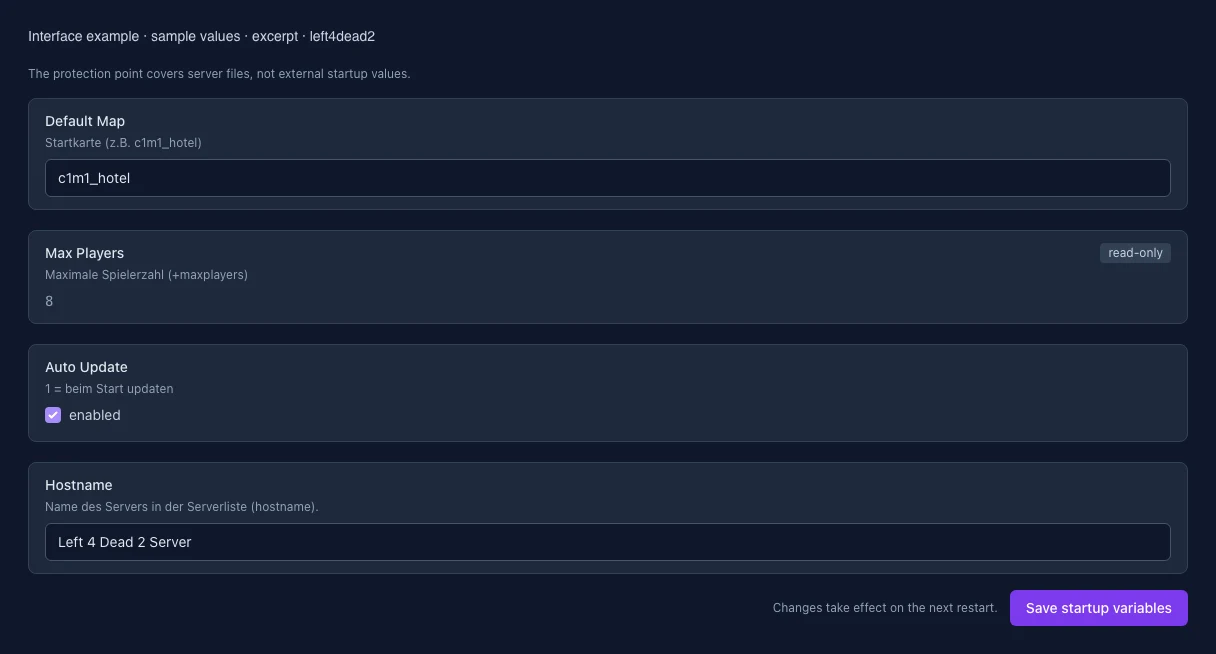
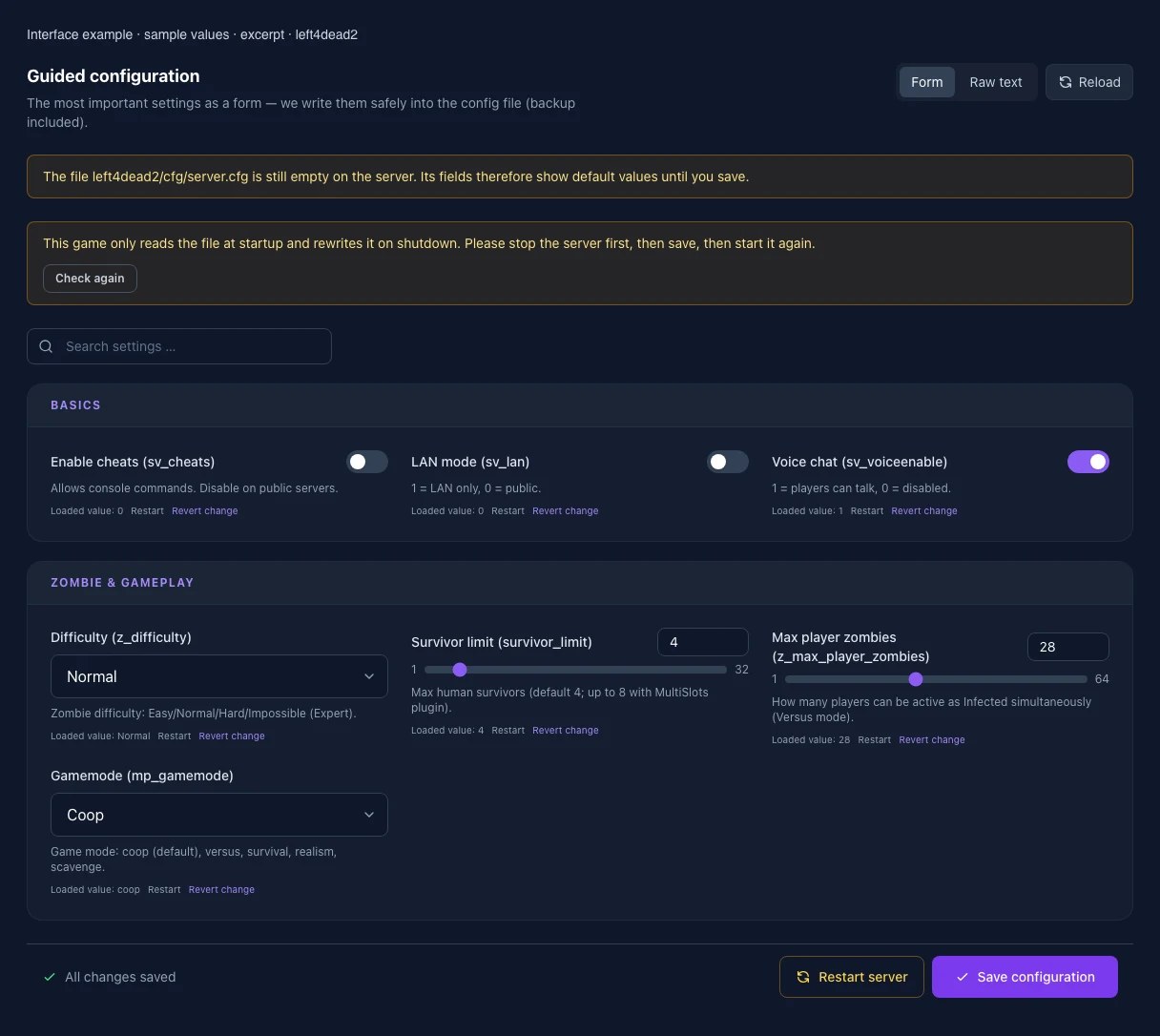
What the interface looks like
The image shows the interface on its capture date; earlier versions may differ.
Excerpt of the current interface with sample values. Values and prerequisites illustrate the controls; available tools depend on server software, plugins and permissions. · Captured on 2026-10-08Excerpt of the current interface with sample values. Values and prerequisites illustrate the controls; available tools depend on server software, plugins and permissions. · Captured on 2026-10-08
What the settings do
These values come from our guided editors. Defaults are the editor starting values; they do not show the contents of a customer server.
Enable cheats (sv_cheats)
Allows cheat console commands. With 1, Left 4 Dead 2 stops answering server queries: the server disappears from the server browser and from server lists. Joining via connect still works.
Setting
sv_cheats
Default
0
LAN mode (sv_lan)
1 = local network only, not visible or queryable from the internet. Keep 0 on a rented server.
Vanilla: 1 to 4, default 4. Vanilla ignores this direct config line. Changes require SourceMod with sm_cvar; more than 4 additionally requires a multiplayer plugin.
Setting
survivor_limit
Default
4
Range / options
1 – 4
Max player zombies (z_max_player_zombies)
Vanilla: 0 to 4, default 4. Number of human infected in Versus mode. Vanilla ignores this direct config line; changes require SourceMod with sm_cvar.
Setting
z_max_player_zombies
Default
4
Range / options
0 – 4
Game mode (mp_gamemode)
Co-op, Versus, Survival, Realism, Realism Versus or Scavenge. Vanilla ignores this direct config line. Choose the mode when starting a map, e.g. map c1m1_hotel versus.
Takes effect after saving and restarting the server.
Max. players
Maximale Spielerzahl (+maxplayers)
Setting
MAX_PLAYERS
Default
8
Range / options
… – 32
When it takes effect
Takes effect after saving and restarting the server.
Auto Update
1 = beim Start updaten
Setting
AUTO_UPDATE
Default
1
When it takes effect
Takes effect after saving and restarting the server.
Server name
Name des Servers in der Serverliste (hostname).
Setting
HOSTNAME
Default
Left 4 Dead 2 Server
When it takes effect
Takes effect after saving and restarting the server.
Loading...
Cookie settings
We use cookies to improve your experience and analyze our website.
Cookie settings
Essential cookies
Required
These cookies are required for the core functions of the website and cannot be disabled.
Analytics cookies
Help us understand how the website and customer area are used (our own usage analytics, Google Analytics, Microsoft Clarity).
Marketing cookies
Allow the pseudonymous matching of an ad click to an order (including your email address as a hash value sent to Google) and the Google Ads tag for remarketing lists.